botBrains Engineer: Put AI to Work on Your Customer Data to Improve Support
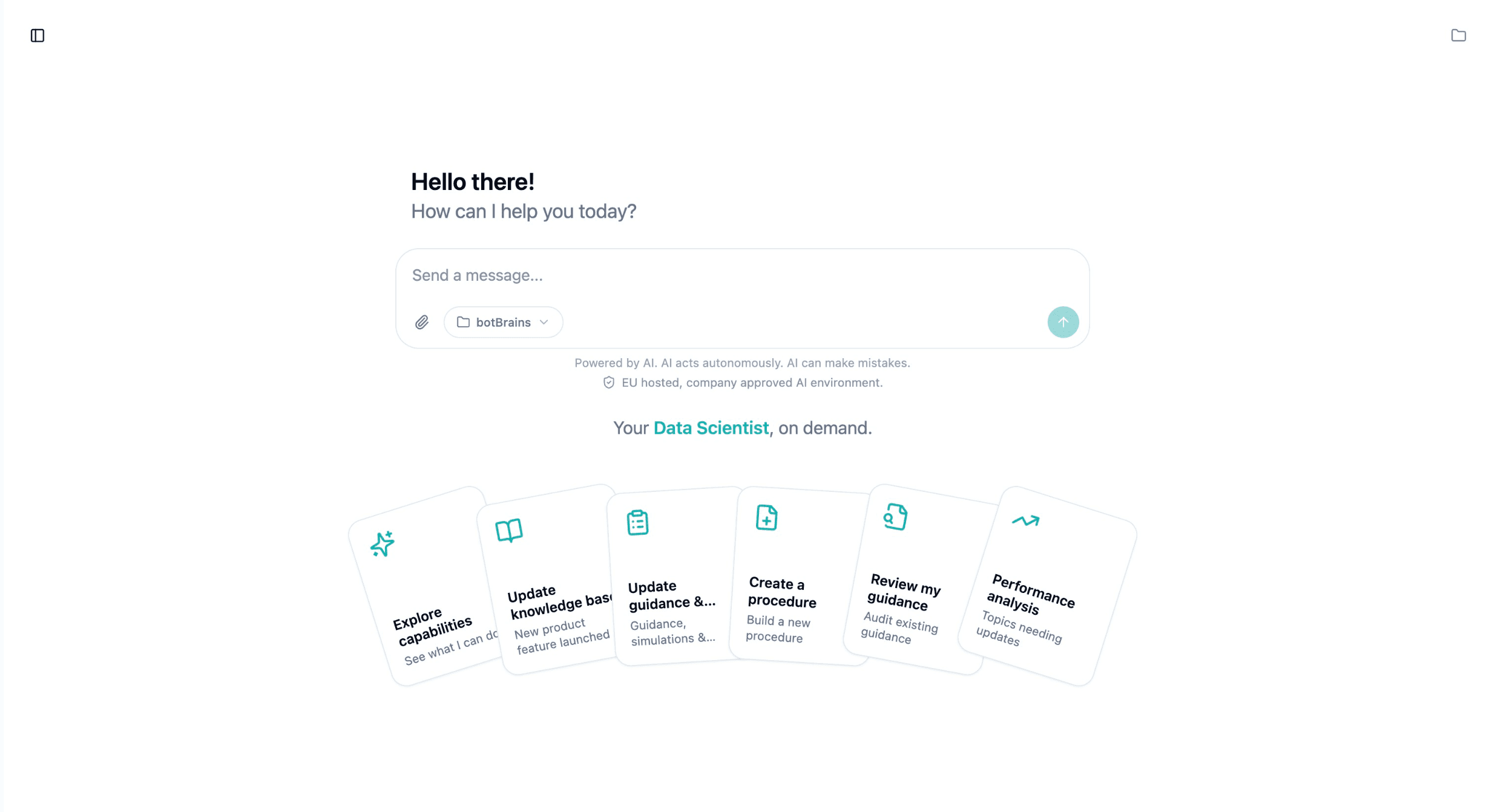
botBrains Engineer brings highly capable AI agents natively into the GDPR-ready botBrains environment. Your whole CX team works on real customer data, builds processes, and connects systems, with no per-seat billing and no weeks of waiting on engineering.

Liam van der Viven
Co-Founder & CTO at botBrains
Today we are introducing botBrains Engineer: a highly capable AI agent that works natively inside botBrains. It makes possible something that has been out of reach for most support teams: putting AI to work directly on your own, real customer data to improve support in a measurable way, in the same GDPR-ready environment where botBrains already handles your customer conversations.
Instead of exporting data into a foreign tool, you bring the agent to the data. And because it is natively integrated, it does not just talk about your data, it can perform any action in the botBrains system: build processes, connect systems, clean up knowledge, test changes.
Why AI on your own customer data has been blocked
Support teams sit on enormous volumes of customer conversations. That is exactly where the answer to "what should we improve next?" lives. Yet very few teams use AI on it, and the reason is the data itself.
The genuinely capable AI tools are not vetted for processing customer data. Using them would mean pushing sensitive data into a separate, ungoverned environment and standing up a new data processor to review and approve. So the analysis never happens. On top of that come two more brakes: every change depends on engineering capacity the support team does not control, and capable AI tools are usually licensed per seat, so only one or two power users ever get access.
botBrains Engineer removes all three brakes at once.
Highly capable agents for your whole CX team, with no per-seat license
Because the Engineer runs natively inside botBrains, the export goes away, the new data processor goes away, and the per-seat license goes away. Every person in your botBrains workspace has access to a highly capable agentic coworker, billed by usage (pay as you go) instead of per seat.
That changes who gets to use AI at all. Not a single power user with a license, but the whole team: the team lead who knows the refund logic, the knowledge owner who remembers the contradictory articles, the QA lead who wants every change verified. They all delegate the same work to the same capable agent, in the same governed space where the customer data already lives.
What the Engineer can do inside botBrains
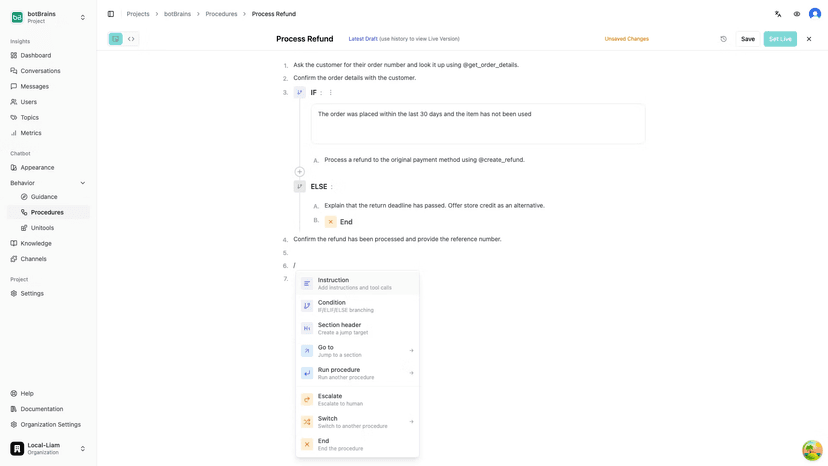
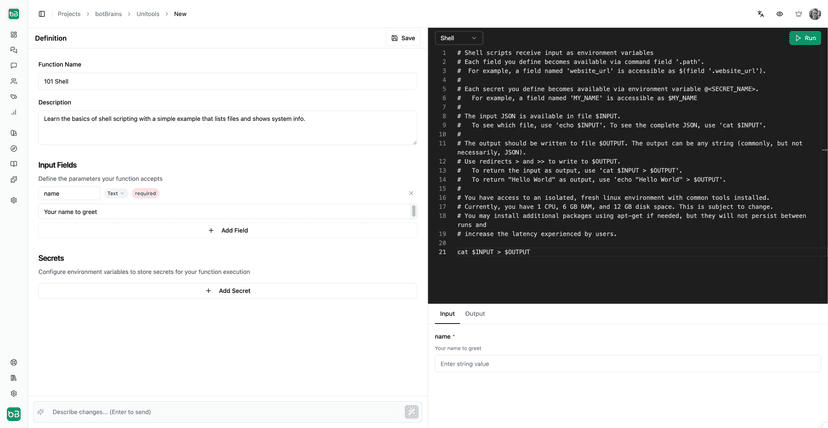
Native integration means the Engineer can perform any action in the botBrains system, not just describe it. It designs and edits Procedures, writes Guidance, cleans up stale and contradictory Knowledge, builds Unitools integrations to your systems, and tests every change in simulation against realistic scenarios before it goes live. Consequential changes always wait for your approval.
Use cases, and how fast they actually get done
The real difference is time. What used to wait on an engineering ticket, a CSM session, or provisioning resources is now a sentence you describe and get back as a tested change.
| Task | The old way | With botBrains Engineer |
|---|---|---|
| Refund flow with eligibility check | Write the requirement, wait on a developer: days to weeks | Described in plain language, simulated, approved the same day |
| Implement a process from a meeting | Notes, ticket, backlog, next sprint | Built straight from the transcript, including system integrations |
| Review and improve Procedures | The QA lead finds time between escalations | "Review my Procedures and give me feedback", instantly |
| Analyze recurring ticket causes | Data export to the analytics team, then wait | Conversations analyzed in the governed environment, with proposed fixes |
Scenario: A team decided in a support-ops meeting to automate self-service unsubscribe. Instead of letting the to-dos rot in a doc, you hand the Engineer the transcript:
"Help me implement the process described in our meeting transcript
automating-user-unsubscribe-transcript.txt.
Build the necessary Procedures and the system integrations
to Stripe and HubSpot."
The Engineer reads the decisions out of the transcript, designs the Procedure, builds the Unitools integrations to Stripe and HubSpot, simulates real customer conversations, and presents the result for your approval. What would otherwise have been a multi-week mini-project waiting on engineering resources is now a conversation.
Example: "Review my Procedures and give me feedback." The Engineer walks through your existing flows, finds gaps, contradictory steps, and missing escalation paths, and proposes concrete improvements. A review a QA lead would otherwise need a quiet afternoon for, which is rarely found between escalations.
Example: You run an in-house system with a custom API that is documented nowhere standard. Just upload the documentation into your dedicated Workspace. From then on it is available to the Engineer across every conversation. It does not have to relearn how your interface works on each new task; it draws on the uploaded knowledge the moment a Procedure or integration needs that exact API.
And that is the point: the Engineer grows more familiar with your business with every conversation. It remembers your preferences and decisions across chats, so it does not start from scratch but builds on what you defined before. Every minute of collaboration leads to more understanding and more customization of your processes, exactly like a good CSM who has known your account for years.
Best practices that benefit every botBrains customer
Here is the important distinction: your customer data, your Knowledge, and your decisions stay strictly scoped to your project. None of it is shared, and nothing is trained on across customers.
What improves centrally is how the Engineer works: how to design a robust Procedure, how to build a Stripe or HubSpot connection cleanly and safely, what a good Procedure review looks for. These best practices are maintained centrally and continually improved. So every botBrains customer benefits from a coworker that keeps getting better, without a single customer record ever leaving their own environment. The method gets better for everyone; the data stays with each customer.
Support teams sit on the very data that tells them what to improve next", said Liam van der Viven, Co-founder & CTO of botBrains. "What was missing was a safe way to point a genuinely capable agent at it, without taking the data out of the governed environment and without buying a license for every person on the team.
"Now the whole CX team gets a coworker that works in the same GDPR-ready space where the data already sits. And because its best practices improve centrally, that coworker gets stronger for everyone at once.
Getting started
botBrains Engineer is available to botBrains customers starting today. There is nothing separate to install, no developer setup, and no per-seat license. The coworker runs through a chat interface inside the product, in the context of your existing project, and is available to every person on the team, billed by usage.
The fastest way to get a feel for it is a concrete first ask. Pick one backlog item and describe it, for example "Build a refund flow that checks eligibility before approving," or "Review our escalation Procedures and tell me where the gaps are." A single shipped win is the quickest way to see how it works.
Learn more on the Forward Deployed Engineer page, or book a meeting to see botBrains Engineer in action.